
Wireless Screen Sharing for Classrooms
Overview
Cast for Education is a desktop application designed to transform a computer into a wireless projector, enabling seamless screen sharing in educational environments. This tool allows teachers to broadcast their screen to students' devices without the need for physical cables or complex setup procedures. The primary purpose is to support interactive and collaborative learning by facilitating real-time content sharing during lessons. It is tailored for educators and students within institutions using Google Apps for Education, making it ideal for modern classrooms that rely on digital tools.
The software operates through integration with the Google Cast protocol, leveraging existing infrastructure in schools. Teachers can quickly set up their devices by installing the app, assigning a name, and inviting students to connect. Students, in turn, use the Google Cast extension in Chrome (version 52 or higher) to join the session. This streamlined workflow reduces technical barriers, allowing more time for instruction and engagement. The solution is particularly effective in large classrooms or lecture halls where traditional projection methods may be limiting.
By eliminating the need for HDMI cables or dongles, Cast for Education enhances flexibility and mobility during teaching sessions. It supports a variety of digital content, including presentations, videos, and live demonstrations. The developer did not provide additional details about the organization behind the tool, but its alignment with Google’s educational ecosystem suggests a focus on scalable, secure, and user-friendly classroom technology.
Key Features & Capabilities
- Wireless Screen Sharing – Enables teachers to broadcast their computer screen to student devices in real time using the Google Cast protocol.
- Simple Setup Process – Users can install the app, assign a device name, and begin sharing with minimal configuration.
- Student Access via Chrome Extension – Students connect using the Google Cast extension in Chrome (version 52 or above), ensuring compatibility with most school-managed devices.
- Integration with Google Apps for Education – Requires a Google Apps for Education account, ensuring secure and managed access within institutional networks.
- Real-Time Collaboration Support – Facilitates live demonstrations, group work, and instant feedback during class sessions.
For example, a teacher can share a live coding session, a science simulation, or a multimedia presentation without switching between devices. Students can view the content directly on their screens, improving focus and participation. The system supports multiple students joining simultaneously, though the exact limit was not specified. This feature is especially beneficial in hybrid learning models where remote and in-person students need equal access to shared materials.
User Interface, Workflow & Performance
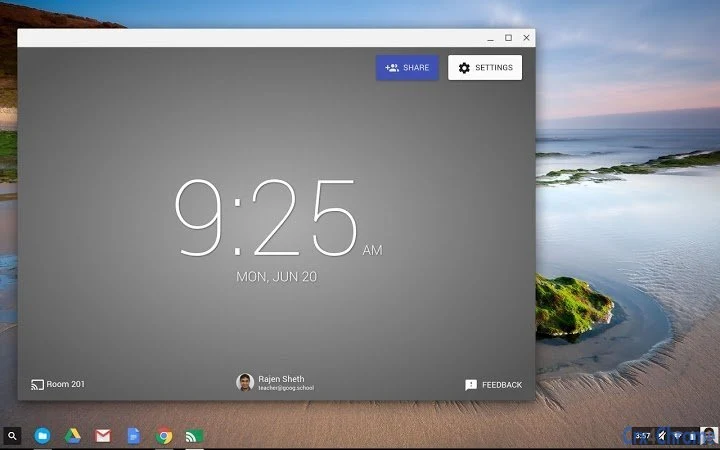
The user interface of Cast for Education is designed with simplicity in mind, focusing on functionality over visual complexity. Upon installation, users are prompted to name their device, which appears in the list of available cast sources. The main window displays basic status indicators and connection controls, allowing teachers to start or stop sharing with minimal interaction.
Navigating the app is straightforward, with intuitive buttons and clear labeling. The workflow is optimized for classroom use: install → name device → invite students → begin sharing. This linear path reduces cognitive load and ensures quick deployment during lesson transitions. The developer did not specify resource usage details, so performance behavior in terms of CPU or RAM consumption remains unknown.
General software behavior patterns suggest stable operation during typical use, but exact stability metrics were not provided. No reports of crashes or lag were mentioned in the available information. The app runs as a background service when active, which may impact system performance depending on the device, though no specific data was given. Overall, the interface prioritizes ease of use and accessibility for non-technical users.
Compatibility & System Requirements
Cast for Education is compatible with both Windows and Mac operating systems, making it accessible to a broad range of educational institutions. The software has a file size of 30 MB, indicating a lightweight installation that should not significantly impact storage capacity.
System requirements were not fully detailed. The developer did not specify minimum CPU, RAM, or GPU specifications. Compatibility with older versions of Windows or macOS was not confirmed. It is known that the software requires a Google Apps for Education account and a Chrome browser version 52 or higher on student devices to function.
Exact performance details were not specified. However, since the app relies on the Google Cast protocol and runs in the background, it is expected to operate efficiently on modern hardware. Users should ensure their devices meet the baseline requirements for running Chrome and the Cast extension. The developer did not provide additional system requirements.
Pros and Cons
Pros
- Simple, fast setup for wireless screen sharing in classrooms
- Free to use with no licensing costs
- Seamless integration with Google Apps for Education
- Supports real-time collaboration across multiple student devices
- Lightweight installation at 30 MB
Cons
- Requires a Google Apps for Education account, limiting use outside schools
- Dependent on Chrome browser (version 52+) on student devices
- Exact system requirements and performance data not disclosed
- Student-side setup requires additional extension installation
- No offline functionality documented
FAQ Section
Is Cast for Education free to use?
Yes, Cast for Education is available at no cost. It is designed as a free tool for educational institutions using Google Apps for Education.
What operating systems does it support?
Cast for Education is compatible with both Windows and Mac operating systems. Specific versions were not provided.
Do students need to install anything to participate?
Yes, students must install the Google Cast extension in Chrome (version 52 or higher) to connect to the teacher’s device.
Is my data secure when using this tool?
The software integrates with Google Apps for Education, which enforces security policies. Users must agree to Google’s Terms of Service and Privacy Policy upon installation.
Can I use this tool without a Google Apps for Education account?
No, a Google Apps for Education account is required to use Cast for Education. It is not available for general public or non-educational use.
Final Thoughts + CTA
Cast for Education offers a streamlined, cost-effective solution for wireless screen sharing in educational settings. Its integration with Google’s ecosystem makes it a reliable choice for teachers seeking to enhance classroom interaction without technical overhead. While some details such as system requirements and performance metrics are not publicly available, the app’s core functionality is well-defined and purpose-built for its target audience.
It is particularly valuable for schools already using Google Apps for Education, where it simplifies content delivery and promotes student engagement. The lightweight design and free access further increase its appeal. However, users outside the educational sector or those without Chrome access may find it less suitable.
For educators looking to modernize their classroom technology, Cast for Education delivers on its promise of simple, secure, and scalable wireless projection. Download Cast for Education now.







